Rethinking SAP Archiving: Cloud Native vs. On-Premise Content Servers

As enterprise organizations accelerate their digital transformation by migrating to SAP S/4HANA or modernizing their existing SAP ECC landscapes, a familiar bottleneck inevitably resurfaces: document and data growth.

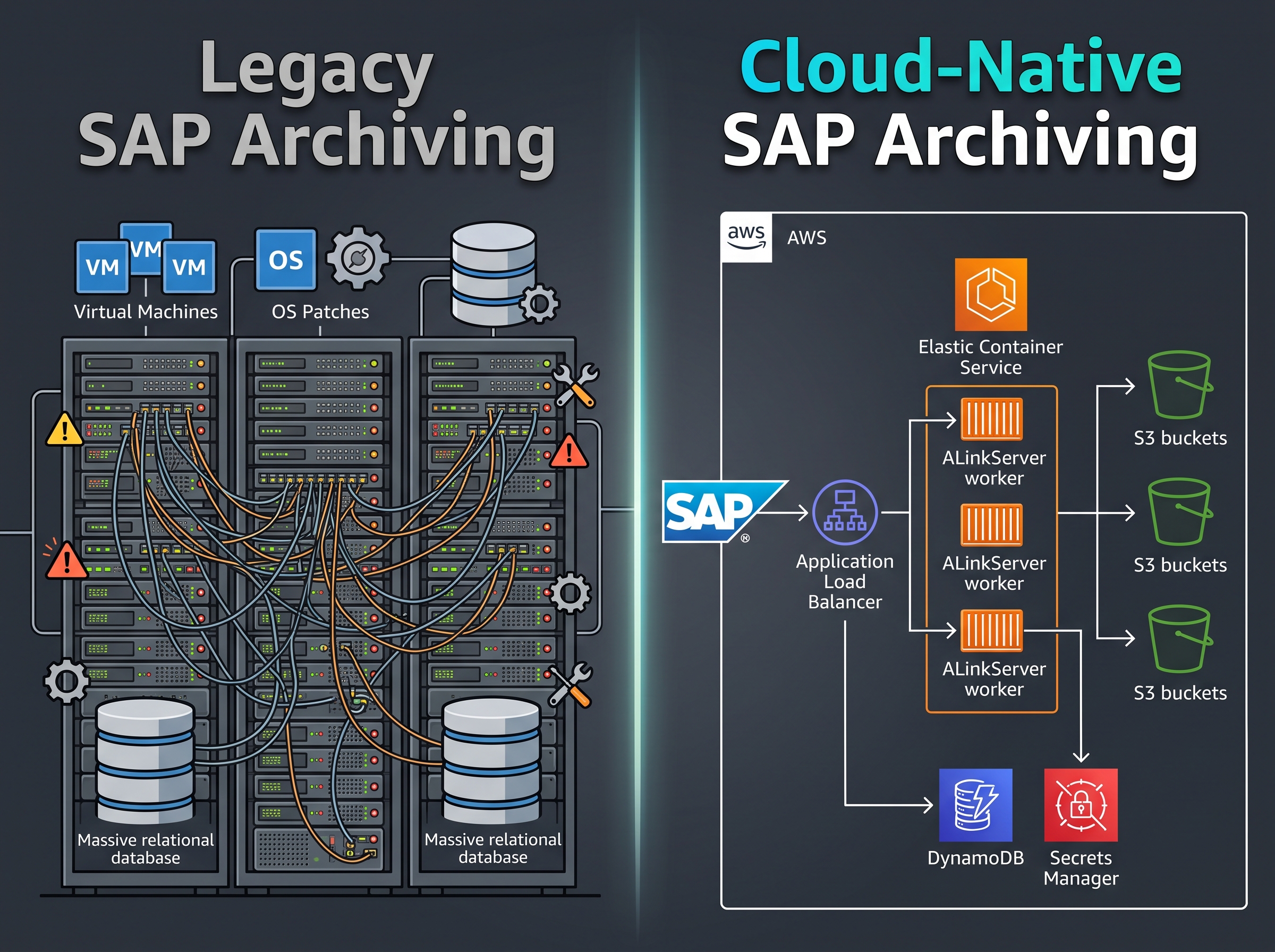
To keep database size under control, maintain SAP performance, and ensure compliance, archiving is non-negotiable. Yet, many organizations still rely on legacy archiving architectures: dedicated virtual machines, complex database backends, heavy third-party software stacks and never ending maintenance tasks.

It is time to ask a fundamental question: Why wrap a modern cloud-first SAP environment around legacy, server-heavy archive infrastructure?

Here is why forward-thinking IT leaders are shifting from traditional on-premise and VM-based archive servers to containerized, cloud-native archiving architectures—and what this transition means for costs, security, and operational simplicity.
blogs_w1_i1_architectures.jpg

The Legacy Trap: The Hidden Cost of Traditional Archive Servers

For decades, the standard approach to SAP document and data archiving involved deploying dedicated Content Servers—either SAP’s standard HTTP Content Server or heavyweight third-party archiving suites. While these systems successfully offload data from the primary SAP database, they introduce significant operational overhead. 

  1. The Virtual Machine & OS Management Burden
    Traditional archiving solutions usually require provisioning multiple virtual machines across development, test, and production environments. Each VM brings an ongoing tax of operating system licensing, hypervisor management, OS security patching, and vulnerability management.
  2. Database Upkeep for Archive Metadata
    Most legacy third-party archiving products rely on their own relational database instances (e.g., SQL Server, Oracle, or PostgreSQL) to map SAP document IDs to physical storage paths. This creates a secondary database ecosystem that requires continuous monitoring, backup jobs, index optimization, and licensing fees—all just to track where historical documents reside.
  3. Proprietary Software Lock-In
    Legacy archiving vendors often mandate proprietary software agents, complex middleware drivers, and annual maintenance fees. Upgrades require extensive testing cycles and coordination across SAP Basis, infrastructure, and storage teams.
  4. Infrastructure Bloat across Landscapes
    When duplicating legacy archive setups across multi-tiered SAP landscapes (DEV, TEST, PROD), hardware footprint and administrative overhead multiply rapidly. What started as a simple document storage requirement turns into a costly infrastructure subsystem.

The Serverless & Containerized Paradigm: Archiving Native to the Cloud

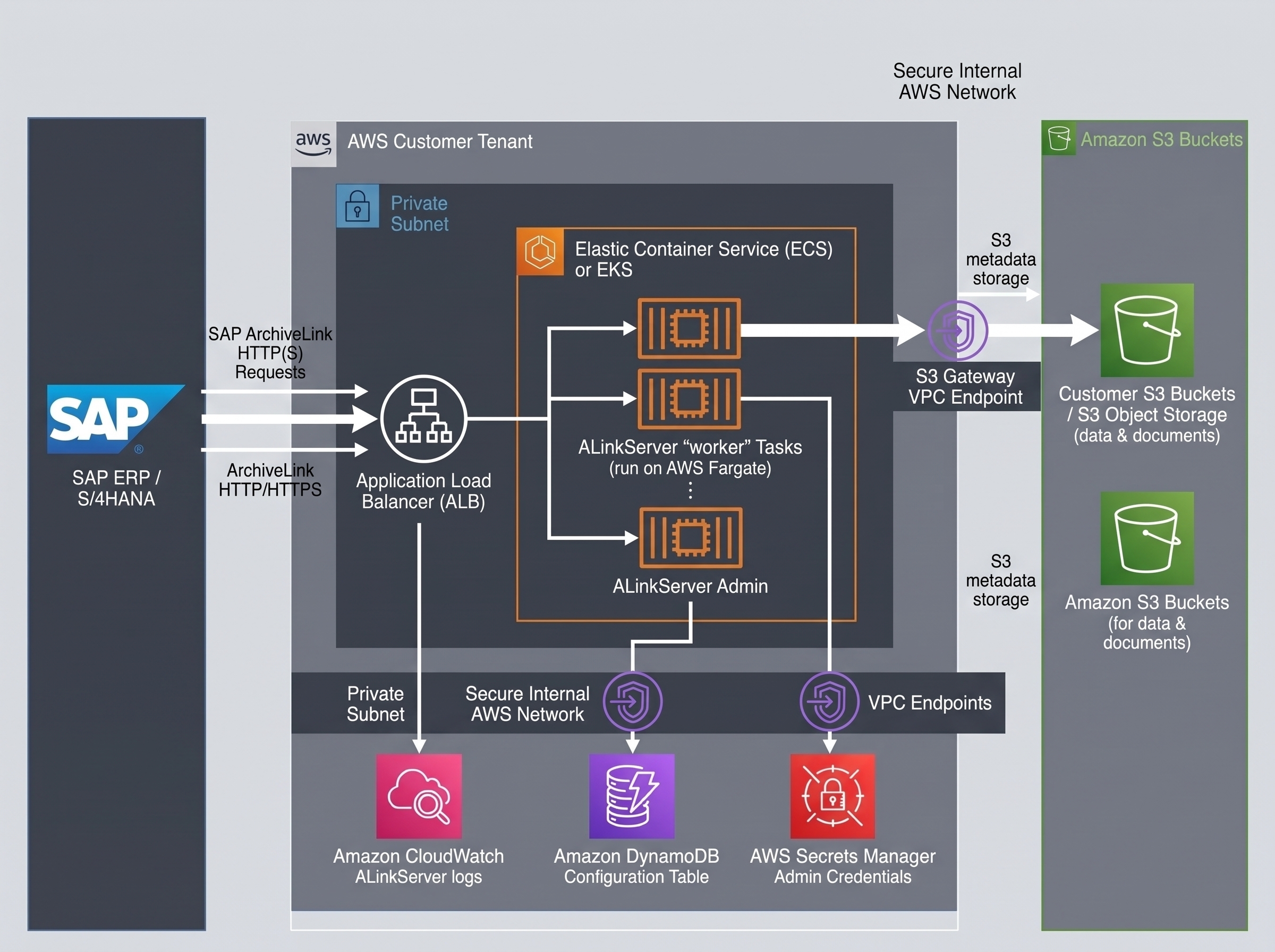
Cloud native solutions like Sol4Cloud ALinkServer represent a fundamental shift: implementing the standard SAP ArchiveLink 4.6 protocol as a lightweight, containerized microservice running natively within your cloud tenant.

blogs_w1_i2_data_flow.jpg

  1. Microservices via Docker & Cloud Orchestration
    Instead of static virtual machines, modern solutions run as Docker containers on serverless compute engines like AWS Fargate within Amazon ECS (Elastic Container Service) or Amazon EKS (Elastic Kubernetes Service). Compute resources scale dynamically based on demand, executing only the CPU and RAM necessary to process active ArchiveLink requests. 
  2. Zero-Database Architecture
    Why maintain a relational database just to hold document metadata? Cloud-native implementations store content-related metadata directly inside Amazon S3 object metadata. System configurations and repository definitions reside in lightweight NoSQL tables like Amazon DynamoDB. This eliminates:
      • Relational database licensing.
      • Database backup schedules and storage costs.
      • Risks of metadata index corruption.
  3. Automated Infrastructure as Code (IaC)
    Rather than spending days configuring web servers and storage adapters, cloud-native solutions deploy in minutes using declarative IaC templates like AWS CloudFormation or EKS Helm charts. The entire infrastructure—including load balancers, IAM roles, container task definitions, and network endpoints—is provisioned automatically and consistently.

Data Sovereignty & Control: Customer-Owned Storage First

When archiving critical business records—such as historical financial ledgers, tax invoices, customer contracts, or HR files—data ownership, retention control, and long-term access guarantees are imporant.

blogs_w1_i3_security.jpg

  1. Storage in Your Own AWS Buckets
    With native solutions like ALinkServer, archived documents are stored directly in customer-owned Amazon S3 buckets. The archiving container acts merely as a secure messenger between SAP and S3. You retain full administrative control over the S3 buckets, encryption keys, and access policies. 
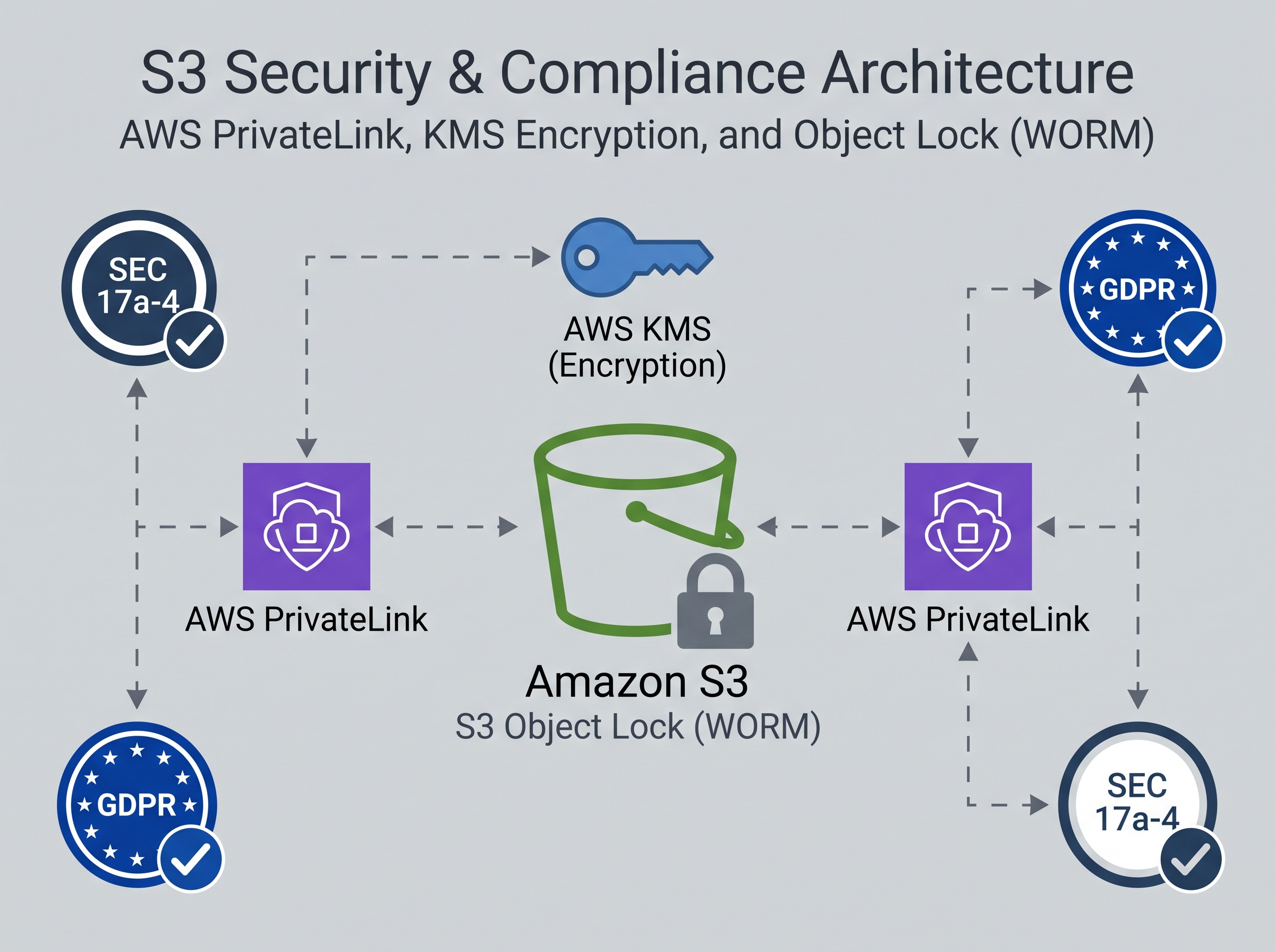
  2. Immutable Compliance with S3 Object Lock (WORM)
    Regulatory compliance mandates require certain document types to be stored in an unalterable Write-Once-Read-Many (WORM) state. Cloud-native archiving leverages native Amazon S3 Object Lock, bucket versioning, and lifecycle policies. Compliance rules are enforced at the cloud storage layer, completely independent of the application layer. 
  3. Air-Gapped Network Security via PrivateLink
    Security teams frequently object to cloud storage solutions that route sensitive corporate records over the public internet. ALinkServer deploys completely within your private AWS Virtual Private Cloud and utilizes AWS VPC Endpoints (PrivateLink) for services like S3, DynamoDB, and Secrets Manager – with that all archiving traffic remains exclusively within AWS’s isolated internal network backbone—never traversing the public internet. 
  4. Zero Vendor Lock-In
    Because data is stored in standard S3 buckets without proprietary wrappers or encrypted blobs, your organization retains direct access to its data forever. Even if you decide to change archiving worker tools in the future, your underlying records remain untouched and accessible in native AWS S3 cloud storage. 

The Strategic Shift: Eliminate Infrastructure Bloat

Modernizing SAP archiving is often viewed as a routine cleanup exercise to prepare for an S/4HANA migration. However, viewing it strictly through the lens of database sizing misses the bigger strategic opportunity.

Replacing legacy archive servers with a serverless, containerized architecture is an opportunity to eliminate infrastructure bloat completely. 

By shifting to a cloud-native model like ALinkServer on AWS:

  1. You eliminate server and OS maintenance for archiving tools.
  2. You eliminate database management, backups, and indexing risks. 
  3. You gain absolute data sovereignty by holding records in your own S3 buckets. 
  4. You align costs directly with consumption through transparent pay-per-use marketplace billing.       

As you map out your SAP cloud strategy, take a closer look at what is supporting your content repositories. It may be time to rethink SAP archiving—and leave dedicated archive servers in the past where they belong.

Ready to modernize your SAP archiving stack?

Explore how Sol4Cloud ALinkServer delivers lightweight, pay-per-use SAP ArchiveLink integration running directly inside your AWS tenant. Deploy in under 20 minutes via AWS Marketplace.