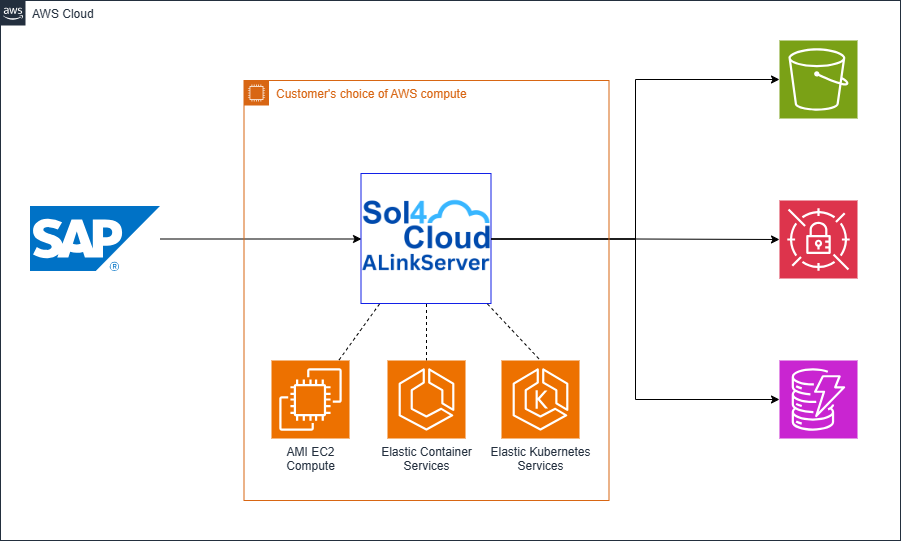
Choosing the Right Compute Option for SAP Archiving
With the introduction of the EC2 AMI, enterprise architects can now deploy ALinkServer across three distinct AWS compute paradigms. Selecting the right platform depends entirely on your organization’s cloud maturity, existing infrastructure automation, and operational preferences.
Option 1: Amazon ECS (Elastic Container Service) with AWS Fargate
For the vast majority of deployments, Amazon ECS utilizing AWS Fargate remains the most frictionless path. ECS deployment option comes with AWS CloudFormation stack that provisions the entire environment—including Application Load Balancers, IAM task roles, and private VPC Endpoints— easy to deploy in a few minutes.
Pros:
-
True Serverless Compute: Fargate removes the need to provision, patch, or manage underlying EC2 operating systems.
-
Rapid Automated Deployment: The CloudFormation template handles all complex networking requirements, ensuring traffic remains exclusively on the internal AWS network without traversing the public internet.
-
Zero Control Plane Costs: Unlike Kubernetes deployments, there is no additional hourly charge for the ECS control plane.
Cons:
Option 2: Amazon EKS (Elastic Kubernetes Service)
For enterprises that have standardized their IT operations around Kubernetes, ALinkServer can be deployed natively into an existing Amazon EKS cluster using our provided Helm charts.
Pros:
-
Unified Workload Management: Manage your SAP archiving nodes using the exact same kubectl commands, namespaces, and CI/CD pipelines used for your other enterprise workloads.
-
Granular Scaling: Leverage Kubernetes-native auto-scaling for frontend document archiving scenarios to handle peak user loads seamlessly.
-
Advanced Ingress: Native integration with the AWS Load Balancer Controller allows for highly customized HTTPS/SSL termination and internal routing configurations.
Cons:
-
Control Plane Fees: AWS charges a fixed fee of $0.10 per hour (roughly $73/month) per EKS cluster control plane.
-
Steeper Learning Curve: Requires significant prerequisites prior to installation, including a running EKS cluster, configured load balancer controllers, and customized IAM service accounts.
Option 3: Amazon EC2 via AMI (Amazon Machine Image)
Released last week, the ALinkServer AMI provides a pre-packaged, hardened virtual machine image for infrastructure teams that prefer managing traditional EC2 environments over container orchestration.
Pros:
-
Seamless Enterprise Integration: Easily fold ALinkServer into your existing EC2 backup policies, OS-level vulnerability scanners, and third-party patch management routines.
-
Direct Host Access: System administrators retain full SSH access to the underlying operating system for deep-level network troubleshooting, packet sniffing, or custom monitoring agent installation.
-
Simplified Networking: Bypasses the need for container-specific Service Connect namespaces or bridge-mode networking overrides.
Cons:
-
Return of OS Management: Your IT team is entirely responsible for patching, updating, and securing the EC2 operating system throughout its lifecycle.
-
Manual Scaling: Unlike Fargate or EKS, high availability and auto-scaling require you to manually configure and maintain EC2 Auto Scaling Groups across multiple Availability Zones.